Usage Instructions
This section of the documentation will prepare your PC to begin developing in Odoo using
ROCKETDOO.
For developers who prefer to work with Windows and WSL2, as seen on the previous page, your PC should already be ready with all initial tools installed.
For those working on Linux operating systems, we will detail the necessary tools that must be installed to get started.
Prerequisites Before Rocketdoo
- Keep Linux packages up to date.
- Have GIT installed or verify that you have it:
Or install it:
- Have Visual Studio Code installed.
- Have Python's package manager
pipinstalled. - Install Docker and Docker Compose using the official guide shared on the Get Started page.
- Install the basic extensions in VSCode:
- Docker
- Dev Container
And most importantly, install the ROCKETDOO framework:
orWe recommend using pipx if you want it installed globally on your machine without breaking Python dependencies.
Why Use PIPX Instead of PIP?
It is very likely that if you attempt to install the ROCKETDOO tool with the traditional pip command, it will return an error with some installation suggestions. This is due to recent changes made by Python PEP 668
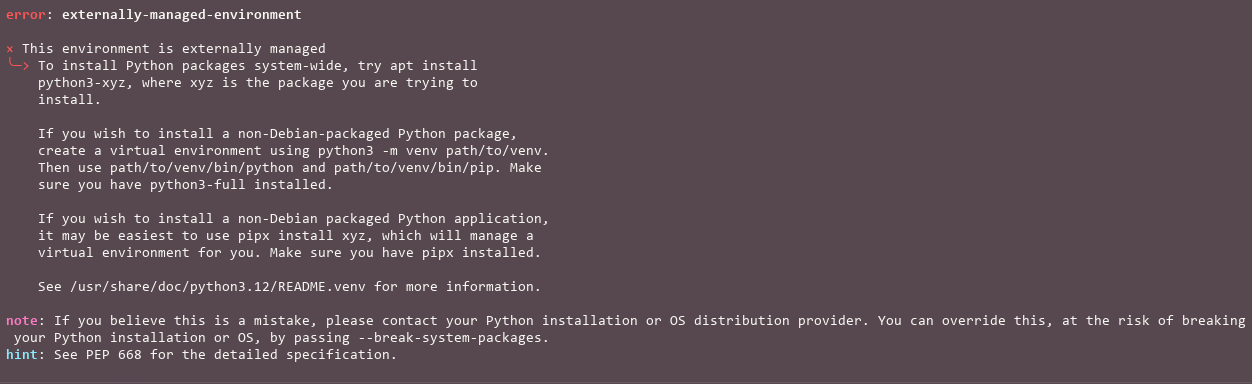
PEP 668
PEP 668 is a Python Enhancement Proposal that marks Python base environments as "externally managed" to prevent package conflicts. This means that the operating system administrator (such as a Linux distributor) manages system Python packages, while users must use virtual environments for their individual projects, rather than installing or updating packages with pip directly on the system.
In Summary:
- What does it do? It prevents Python developers from installing or updating packages directly in the operating system environment.
- Why? To avoid corrupting or overwriting packages managed by the system, which could break the system installation.
- How is it solved? For projects, a virtual environment (such as venv) should be used, and for standalone applications, pipx can be used.
- When was it implemented? On Linux distributions, which generates an error message if you attempt to use pip to modify the system environment.
For this reason, we suggest that to have ROCKETDOO installed globally on your computer, allowing you to execute an environment in any directory created for development without any issues, use PIPX
NOW WE CAN GET STARTED!!! >>>>>