Welcome to RKD as ROCKETDOO!
Version 3.5 of ROCKETDOO — a rebuilt Graphical User Interface in Spanish and English, CI you can generate for your own project, and nested addons Odoo can finally reach — on top of the golden paths, Mailpit integration, Traefik reverse proxy, and full VPS instance deployment.
Rocketdoo is a development and delivery platform for Odoo teams that standardizes, automates, and abstracts the lifecycle of Odoo environments, from local development all the way to deployment.
Rocketdoo is a Python-based framework designed to provide a fast and efficient development environment.
With Rocketdoo, you can deploy one or several environments for Odoo development in just a few simple steps. It allows you to create new modules or features for both the Enterprise and Community editions.
What's New in 3.5
🖥️ A GUI that says where you are, in your language
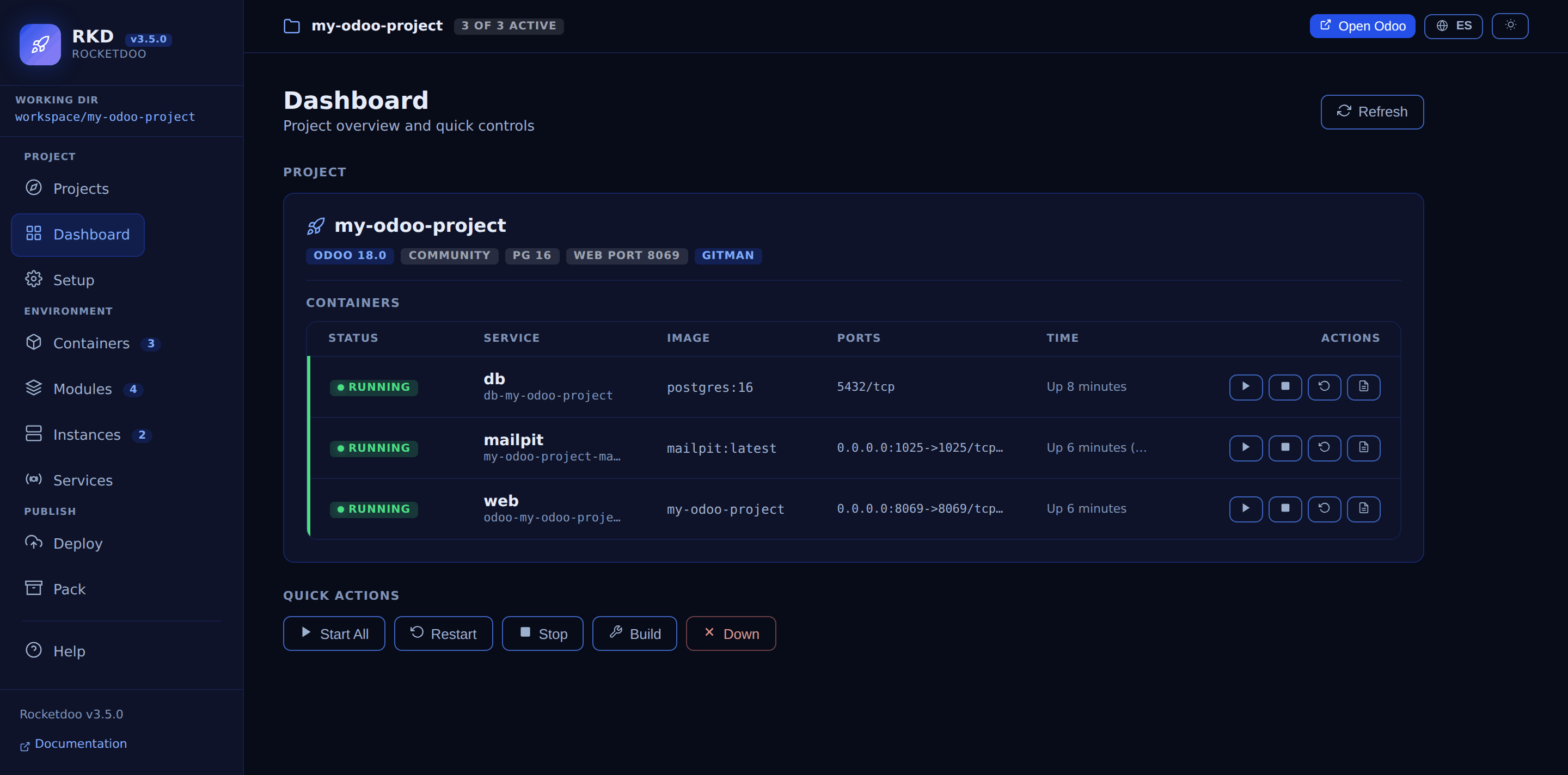
The interface was rebuilt around what changes while you work:
- A permanent top bar with the active project and a pill counting running containers, so no screen leaves you guessing which project you are acting on.
- Grouped sidebar navigation — Project, Environment, Publish — plus a new Projects screen that discovers every Rocketdoo project on the host and switches between them without restarting the server.
- A light theme that meets WCAG AA contrast, and with no saved choice the GUI follows your operating system instead of always starting dark.
- Spanish and English, switchable from the top bar. What the GUI only relays — Docker logs,
addon names, container names, raw
docker compose psstatus — is left untouched in both.
⚙️ CI for your project (rkd ci)
rkd ci init writes a GitHub Actions workflow into your project that lints your addons and
installs them against a real Odoo:
rkd ci init        # writes .github/workflows/rkd-ci.yml
rkd ci prepare     # regenerates what a clean clone does not carry
rkd ci modules     # the installable modules Odoo can reach
It never overwrites a workflow that differs from what it would write, and the expensive install job is limited to pull requests by default, because Actions minutes are a shared quota on private repos.
📁 Nested addons Odoo can actually reach
Odoo reads a static addons_path, so a module at addons/oca/web_responsive was invisible unless
that subdirectory was listed. rkd up, rkd restart, rkd build --rebuild, rkd ci prepare, the GUI's Up and the per-module
update now keep the path in sync with what is actually under addons/; rkd info warns without
writing. Entries that are not
Rocketdoo's own — Odoo's default, enterprise, Gitman's external_addons, your own paths — are
kept exactly as they are, in order.
📧 rkd mail configures the mail server, not just the transport
Since 3.3. rkd mail on now also creates the ir.mail_server record Mailpit (rkd) in your database, so
Odoo actually routes through Mailpit. off only archives it — it never deletes, so a mail server of
your own is never at risk. Projects with more than one database need --db NAME.
🔑 The GUI asks for a session token
Since 3.4, every rkd gui prints a URL carrying a session token, and the API rejects anything
without it. The token is good for as long as that server runs, and restarting it issues a new one. Browsing to http://localhost:8070 on its own no longer works — use the URL it
prints, or --open.
What's New in 3.2
Version 3.2 does not add a new subsystem: it makes the existing ones predictable.
🧭 Golden Paths (rkd profiles)
A golden path is a named, supported combination of Odoo version, edition and PostgreSQL version. Rocketdoo ships ten of them — Odoo 15 to 19, Community and Enterprise — and they are now the source of truth for both the wizard and non-interactive setup:
rkd profiles list              # the whole matrix
rkd profiles show odoo18-ce    # detail of one profile
rkd init --profile odoo18-ce   # create the environment without any prompts
Three of them (odoo15-ce, odoo18-ce, odoo19-ee) are built by CI on every release PR; the rest
are best effort. Odoo↔PostgreSQL compatibility is validated now, so the wizard can no longer produce
an unsupported pairing — Odoo 19, for instance, requires PostgreSQL 13 or above.
✅ Test suite and a real CI gate
Rocketdoo now has a pytest suite of over 900 tests, plus ruff for linting, running on every pull
request across Python 3.10 to 3.13, with Docker end-to-end tests, a package build check and a
render-and-build pass over the golden paths. Nothing is continue-on-error any more: a red job means
the change does not merge.
🔧 Fixes worth upgrading for
- Docker build failed on Odoo 18 and 19. The generated
Dockerfileremoved the PEP 668 marker in its own layer, butapt install python3-devpulls in thepython3.Npackage, which puts the file back — so the laterpip installdied withexternally-managed-environment. Only Ubuntu noble images (odoo:18.0,odoo:19.0) ship that marker, which is why the older versions were unaffected. All five images are now built in CI. rkd packalways failed withUnboundLocalErrorwhen run with--no-db, or before any database existed — the two normal ways to use it. Present in 3.1.8 and earlier.- The GUI API accepted requests from any origin.
rkd guinow only accepts calls from its own origin. Binding to127.0.0.1was never protection here: the request comes from the user's own browser, so any page visited while the GUI was running could list the filesystem and stop containers.
What's New in ROCKETDOO Version 3
Version 3 is the most complete release of ROCKETDOO to date. It keeps everything from version 2 and adds four major new capabilities:
🖥️ Graphical User Interface (GUI)
Rocketdoo v3 ships with its own web-based GUI, launched directly from the terminal with a single command:
The GUI opens in your browser at the URL rkd gui prints — since 3.4 that URL carries a session
token — and provides:
- Dashboard — project overview with container status, Odoo version, PostgreSQL version, and quick access links.
- Container controls — start, stop, restart, build, pull, and remove containers without typing Docker commands.
- Live log viewer — real-time streaming logs from any container.
- Mail (Mailpit) — enable/disable the email testing service directly from the interface.
- Modules — list and manage Odoo add-on modules.
- Deploy — run deployment operations from the GUI.
- Instance — manage VPS deployment targets.
- Pack / Unpack — share or restore full development environments.
- Gitman — manage third-party repository dependencies.
- Traefik — configure the reverse proxy integration.
- Dark and light mode — toggle the theme to match your preference.
📧 Mailpit Email Testing (rkd mail)
The new mail command integrates Mailpit — a local SMTP server and web UI that captures all outgoing emails from Odoo instead of sending them.
rkd mail on       # Enable Mailpit and configure Odoo SMTP
rkd mail off      # Disable Mailpit and restore defaults
rkd mail status   # Show current status
rkd mail open     # Open the Mailpit web UI in the browser
🌐 Traefik Reverse Proxy (rkd traefik)
The traefik command makes it easy to expose your local Odoo instance using a custom domain, either for local development or full production with HTTPS and Let's Encrypt.
rkd traefik on      # Interactive setup: domain, mode (local/production)
rkd traefik off     # Remove Traefik integration from the project
rkd traefik status  # Show current Traefik configuration
rkd traefik guide   # Step-by-step guide for local domain setup
🚀 Full VPS Instance Deployment (rkd instance)
The instance command allows you to deploy a complete Odoo instance to a VPS — either as a Dockerized build or as a native installation — using a simple interactive wizard.
rkd instance init                # Configure stage/prod environments interactively
rkd instance deploy --env stage  # Deploy to staging
rkd instance deploy --env prod   # Deploy to production
rkd instance status              # Show configured deployment targets
From Version 2 — Still Available
All features from ROCKETDOO v2 are fully preserved:
rkd scaffold/rkd init— project scaffolding and configuration wizard.rkd up,rkd down,rkd restart,rkd stop,rkd build,rkd status,rkd logs— Docker container management.rkd pack/rkd unpack— share and restore full environments.rkd del -i— clean up.Identifierfiles created by WSL2.rkd deploy— module deployment to Odoo SH, VPS, or Dockerized instances.
On the following page, you can find detailed information about deployments using rkd. >>> Deployment
Rocketdoo v3 is more powerful and easier to use than ever before...
Overview
This tool was designed for developers who are just getting started with Odoo, as well as for experienced developers who want to quickly deploy environments and focus solely on building new modules and features.
It’s important to note that Rocketdoo is just one of many tools available in the Odoo development ecosystem. It does not aim to be the only or the best option — rather, it’s a practical solution that adds value, covers common development needs, and optimizes and automates the developer’s workflow.
We know that the Odoo ERP system is broad, powerful, and complex. Depending on the client, the business requirements, or the localization being implemented, it’s necessary to consider a series of dependencies that go beyond pure development. These may include required Python libraries, specific dependencies for certain features, third-party modules, or external repositories needed to ensure a successful implementation.
All these requirements and configurations often become a real burden for developers.
That’s why Rocketdoo was created — to provide an automated and intuitive environment that serves both individual developers and development teams. Rocketdoo simplifies the process of setting up a development environment and lets you focus on what really matters: building new modules and features.
Description
To better understand what Rocketdoo is and how to use it properly, let’s go through a brief description of the required tools and their purpose.
First, it’s important to mention that Rocketdoo was designed and developed to create development environments on Linux-based operating systems, such as Ubuntu or Debian. We consider Linux to be the most suitable system for working with this framework for the following reasons.
Rocketdoo relies on the following tools to perform its functions:
- Docker y Docker Compose.
- Git y GitHub (or any version control manager).
- Llave SSH for managing private repositories.
- Gitman.
- Python and its packages manager
piporpipx. - Command Line Interface (CLI) usage.
- Visual Studio Code.
- Required Visual Studio Code extensions (listed later)
This list of required tools — especially Docker and Docker Compose — is one of the main reasons why we recommend using Rocketdoo on a Linux operating system.
However, we understand that many developers prefer using Windows. In that case, we strongly recommend using the Windows Subsystem for Linux version 2: WSL2.