Command Line Interface
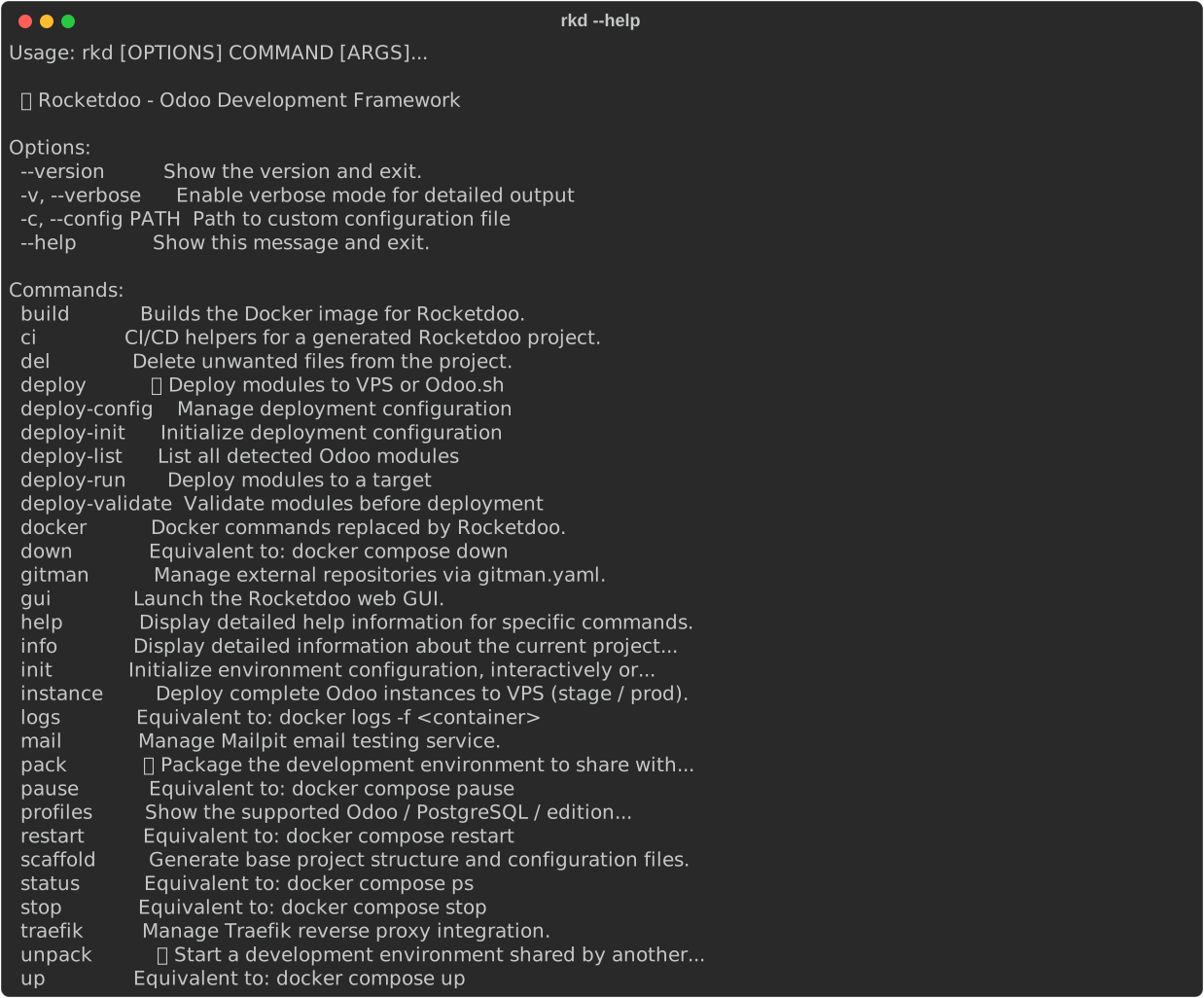
Here are the most common commands you can use in RKD ROCKETDOO.
You can use either
rocketdooor the shorter aliasrkd— both are equivalent.TIP: Combine any command with
--helpto see its flags and options.
Example:rkd build --help
General
- Display Rocketdoo version:

- Display help and available commands:
Project Setup
- Generate the directory and file structure:
- Launch the initialization wizard:
- Or create the environment straight from a supported profile, with no questions asked:
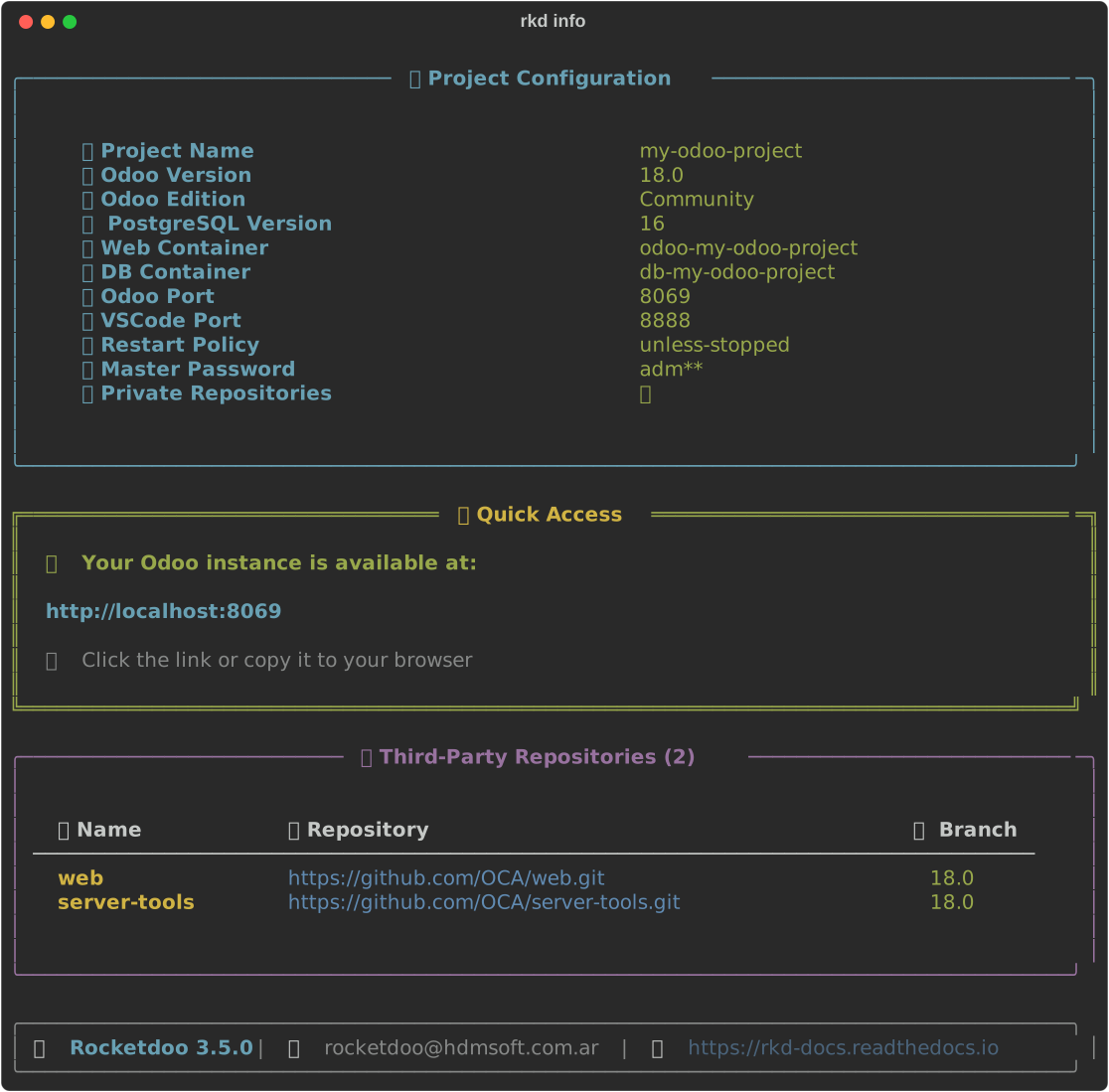
- Display detailed information about the current project:
Since 3.5,
rkd infoalso warns when a module underaddons/sits in a subdirectory that Odoo'saddons_pathdoes not cover. It only warns, never writes. What writes the path:rkd up,rkd restart,rkd build --rebuild,rkd ci prepare, the GUI's Up and the per-module update.
Golden Paths (rkd profiles)
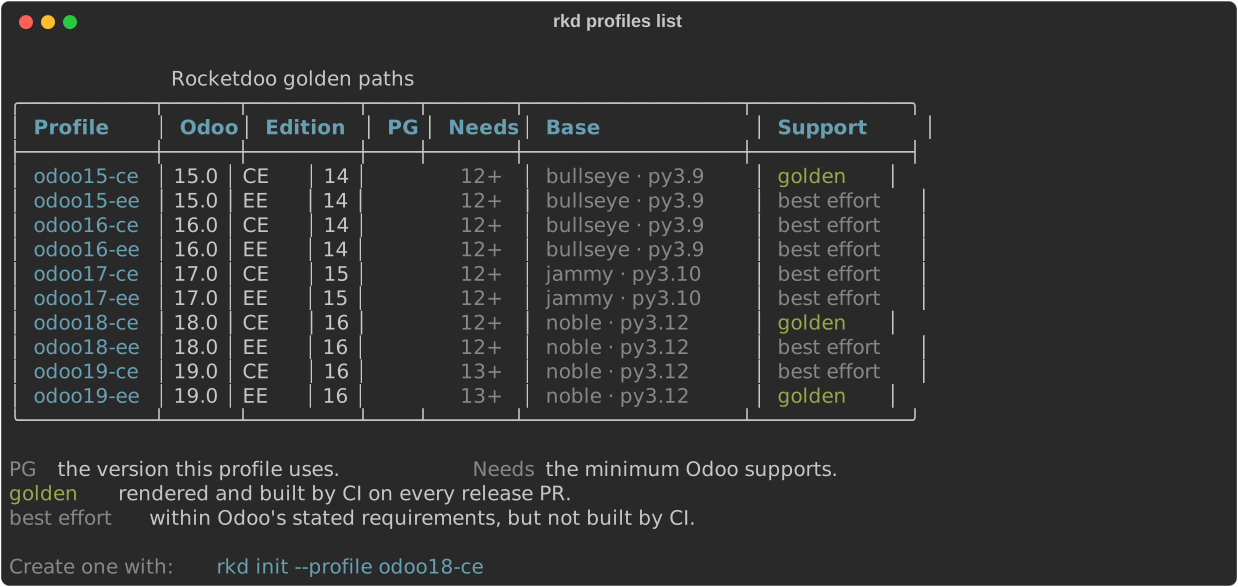
New in 3.2. A golden path is a named, supported combination of Odoo version, edition and PostgreSQL version. Rocketdoo ships ten of them, and they are the source of truth for both the
rkd initwizard andrkd init --profile.
- List the whole matrix:
- Show the details of a single profile:

- Create that environment end to end, without the wizard:
Support levels
| Level | What it means |
|---|---|
| golden | CI renders and builds this combination on every release PR. These are the ones to choose. |
| best effort | Within Odoo's stated requirements and offered by the wizard, but not built by CI. Reports are welcome, but there is no guarantee. |
The golden combinations today are odoo15-ce, odoo18-ce and odoo19-ee: between them they cover
the three different base images the odoo: images use, and both editions.
Compatibility matrix
Per-image data was read from the published odoo: images; the PostgreSQL minimums come from Odoo's
own installation documentation.
| Odoo | Base | Python | pip | Minimum PostgreSQL | Recommended |
|---|---|---|---|---|---|
| 15.0 | debian-bullseye | 3.9 | 20.3.4 | 12 | 14 |
| 16.0 | debian-bullseye | 3.9 | 20.3.4 | 12 | 14 |
| 17.0 | ubuntu-jammy | 3.10 | 22.0.2 | 12 | 15 |
| 18.0 | ubuntu-noble | 3.12 | 24.0 | 12 | 16 |
| 19.0 | ubuntu-noble | 3.12 | 24.0 | 13 | 16 |
Odoo 19 raised the PostgreSQL minimum from 12 to 13. Rocketdoo now validates the pairing when the
profile is loaded: a db_version below the minimum for that Odoo version is an error, not a warning,
so the wizard can no longer produce an environment that will not start.
Odoo 19 and AI: Odoo 19's AI features need the
pgvectorextension, which ships for PostgreSQL 15 and above.rkd profiles show odoo19-*warns you when the profile uses a lower version.Enterprise: any
*-eeprofile expects an./enterprisedirectory with the Odoo Enterprise add-ons (subscription required) next toaddons/before you runrkd up -d.
Container Management
- Deploy Odoo (start containers in detached mode):
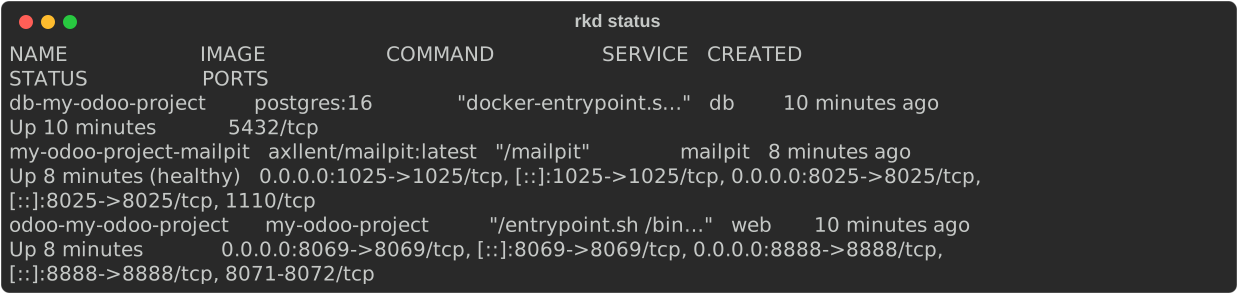
- Check the status of your containers:
- Stop all containers:
- Restart the containers:
- Remove containers:
- Remove containers and their associated volumes:
- Force environment rebuild:
- Build and restart containers in one step:
- View container logs:
- Follow logs in real-time for a specific container:
Environment Sharing
- Package your entire environment to share with other developers:
- Unpackage a shared
.zipproject into your directory:
Utilities
- Delete
.Identifierfiles generated by WSL2 when copying files from Windows:
- Preview which files would be deleted (dry run, no files removed):
- Bulk update module packages loaded as public repositories using Gitman:
(This command must be executed inside the container.)
⚙️ Continuous Integration (rkd ci)
New in 3.5.
rkd ciwrites a GitHub Actions workflow for your project — not for Rocketdoo. It lints your addons and, optionally, installs them against a real Odoo.
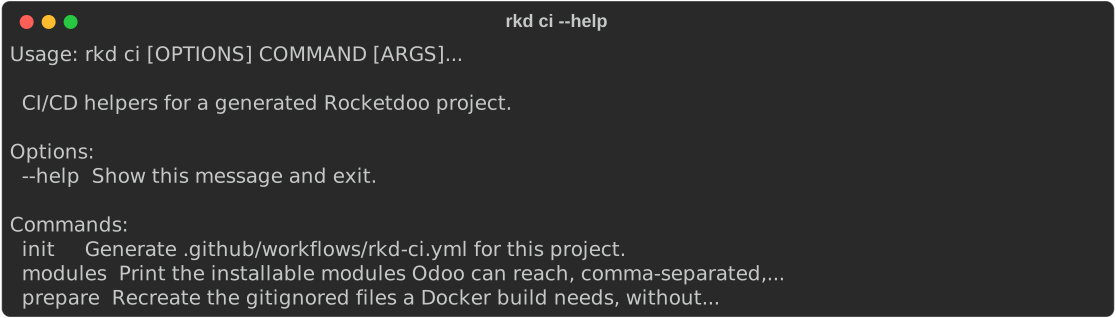
- Generate
.github/workflows/rkd-ci.yml:
On a terminal this asks you when the install job should run, defaulting to pull_request.
Answer up front, or skip the question entirely:

| Option | Description |
|---|---|
--install-trigger |
When the install job runs: pull_request, push, manual, never. Asked interactively if omitted; pull_request without a terminal |
--force |
Overwrite a workflow that differs from the current render |
-y, --yes |
Skip the install-trigger question and take the default |
It never overwrites a file that differs from what it would write, without --force, whether the
difference came from you editing it by hand or from a config change. What it tells you: Created:
for a new file, already up to date when it matches, a warning naming --force when it differs,
and Overwritten: when you pass it.
- Regenerate the files a clean clone does not carry:

config/odoo.conf and odoo_pg_pass are gitignored — they hold credentials — so a fresh clone does
not have them. The build copies config/odoo.conf into the image (COPY ./config/odoo.conf) and
compose feeds odoo_pg_pass in as a secret at startup, so without this step a clean checkout gets
nowhere. It also syncs the addons_path. It never overwrites an odoo.conf that already exists,
which is what the output above is reporting.
Pass --admin-passwd to set the master password it writes; otherwise one is generated.
- List the installable modules Odoo can actually reach:

Prints them comma-separated on stdout, for MODULES=$(rkd ci modules) inside the workflow.
What the generated workflow does
| Job | When it runs | What it costs |
|---|---|---|
| Lint | Every pull request, pushes to the default branch, and manually | Seconds |
| Install | Pull requests against the default branch, by default | Several minutes |
The workflow triggers on pull_request, on push to the default branch only, and on
workflow_dispatch. Pushing a feature branch with no pull request open runs nothing. The lint job
runs ruff check over addons/ and then rkd deploy validate -p addons.
The install job is the expensive one, which is why it is limited by default. On private repos
the Free plan gives 2,000 Actions minutes a month shared across your whole account; public repos
do not consume that quota. Change the trigger with --install-trigger if that split does not suit
you.
Those numbers are GitHub's, not Rocketdoo's, and GitHub changes them: check the current Actions billing.
Manifest linting. Ruff's default rules flag B018 on every __manifest__.py — by Odoo's own
definition it is a bare dict literal — so the generated workflow passes
--extend-per-file-ignores "**/__manifest__.py:B018". Without it the lint job is red on every Odoo
project.
rkd ci initsigns off with "the lint job runs ruff with its default rules". The generated workflow does add the exception above — the message is the thing that is imprecise, not the workflow.
What is outside the generated path
- Enterprise, and private repos over SSH. The workflow is still written, without the install job and with the reason as a comment: a runner has no access to your private sources.
- Private Gitman sources.
rkd ci initwarns ifgitman.yamlhasgit@/ssh://sources, but it cannot tell a private HTTPS repo from a public one — that build fails on the runner with no warning up front. - Deploying to staging. Deliberately left out for now:
rkd deployhas no headless way to generate adeploy.yaml, so the generated workflow only lints and installs.
📧 Mail — Mailpit Email Testing (rkd mail)
Mailpit is a local SMTP server and web UI that captures all outgoing emails from Odoo instead of actually sending them. Ideal for testing email workflows without affecting real users.
- Enable Mailpit (start service + configure Odoo SMTP automatically):
- Disable Mailpit and restore default SMTP settings:
- Check the current Mailpit status:
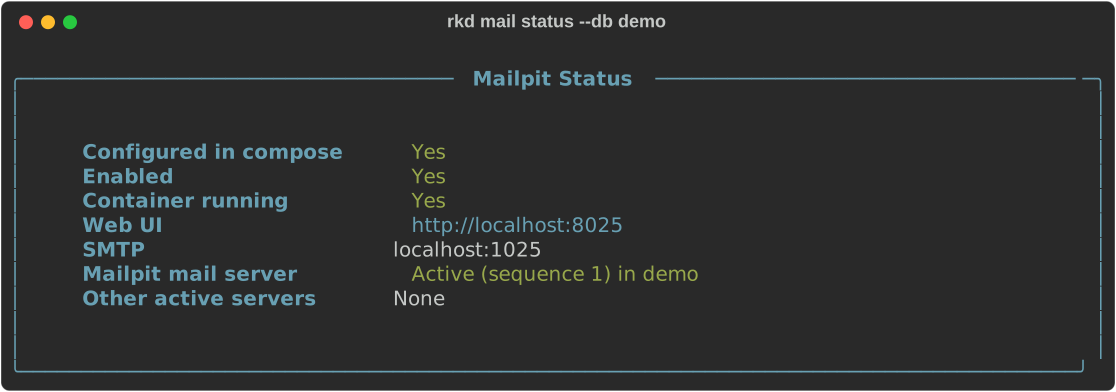
- Open the Mailpit web interface in the browser:
Mailpit web UI is available at
http://localhost:8025when active.
The mail server record in Odoo
New in 3.3. On top of the compose and
odoo.conftoggle,on/off/statusnow read and write anir.mail_serverrecord in your database, namedMailpit (rkd), withsmtp_host = mailpitandsequence = 1. Before this, enabling Mailpit configured the transport but left Odoo still pointing at whatever mail server the database had.
off only archives the record (active = false) — it never deletes, so a mail server of your own
is never at risk. The record is matched by name plus smtp_host: if you rename it by hand, off
will not find it (and says so) and on will create a new one.
Multi-database projects need --db:
With exactly one database in the project it is picked automatically. With two or more and no
--db, the command neither reads nor writes the record, and tells you.
The db container has to be up for this part. If it is not, the compose and odoo.conf toggle
still happens and the mail server step is reported as not done — run rkd up -d and retry the same
command.
Known limit.
sequence = 1does not guarantee Mailpit wins. Odoo filters mail servers byfrom_filterbefore ordering bysequence, so another active server whosefrom_filtermatches the sender can beat Mailpit anyway.rkd mail statuswarns when other active servers exist, but it does not read or writefrom_filter.
🌐 Traefik Reverse Proxy (rkd traefik)
Traefik allows you to expose your local Odoo instance using a custom domain, both for local development (HTTP) and production environments (HTTPS with Let's Encrypt).
- Enable Traefik for this project (interactive wizard — prompts for domain and mode):
- Enable with specific options:
rkd traefik on --domain myproject.local --mode local
rkd traefik on --domain myproject.com --mode production
- Disable Traefik for this project (restores direct port access):
- Show Traefik integration status:
- Show step-by-step guide to configure local domains (
/etc/hostsand WSL2):
Traefik modes: - local — HTTP only, custom domain via
/etc/hosts. - production — HTTPS with automatic Let's Encrypt certificate.
🚀 VPS Instance Deployment (rkd instance)
The instance command deploys a complete Odoo instance to a VPS. It supports two deployment types:
- docker — transfers Dockerfile + compose files and builds on the VPS.
-
native — installs Odoo via official apt packages on the server.
-
Configure stage/production environments interactively (saves to
.rkd/instance.yaml):
- Overwrite an existing configuration:
- Deploy to the staging environment:
- Deploy to production (with confirmation prompt):
- Deploy to production skipping the confirmation:
- Preview generated files without deploying (dry run):
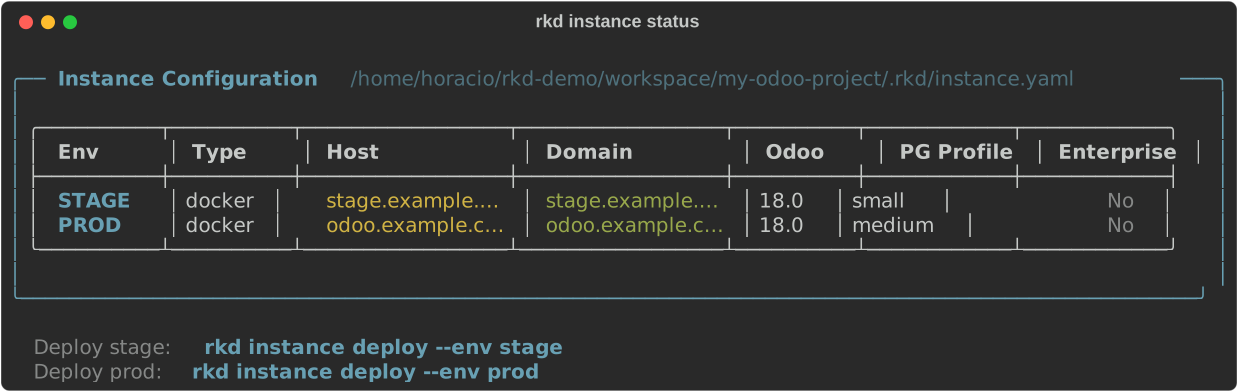
- Show status of all configured deployment targets:
🖥️ Graphical User Interface (rkd gui)
Launch the Rocketdoo web GUI in your browser. Provides full container management, live logs, mail, deploy, and more — all without typing commands.
- Start the GUI on the default port (8070):
Since 3.4, read the URL it prints. Every run generates a session token and the GUI does not load without it:
http://127.0.0.1:8070/?token=<token>. Browsing tohttp://localhost:8070on its own gets you nothing, and restartingrkd guiinvalidates the previous token. See Graphical Interface (GUI).
- Start the GUI on a custom port:
- Start the GUI and open the browser automatically:
- Start the GUI for a project in a specific directory:
The GUI is available at
http://localhost:8070by default — on the tokenised URL it prints. PressCtrl+Cto stop it.